


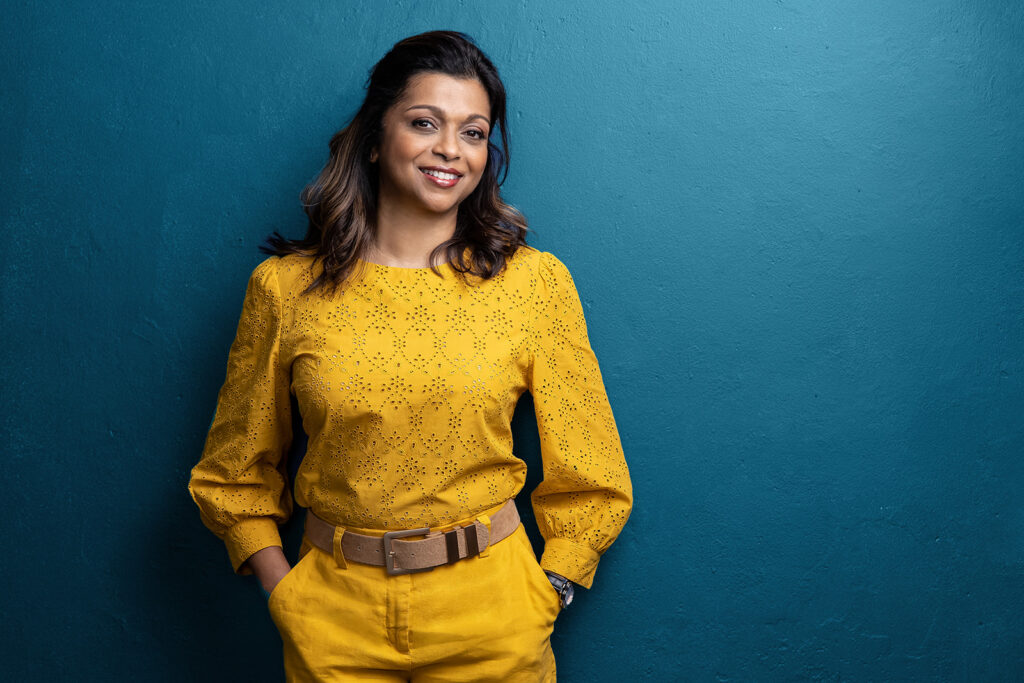


A media kit needs a small, consistent set of photos: a current headshot, a wider portrait with room around you, a landscape photo with space for text, one or two shots of you doing the work, and a black and white version. Add work, product or book photos only if they’re part of the story.
Most people think a media kit’s mostly about the bio. They spend an evening polishing three paragraphs about themselves, then attach whatever photo is closest to hand.
The photos are the part organisers can’t work around, and the part that most often goes wrong.
The usual failure is a tight LinkedIn crop, small enough for an email signature, which an event organiser then has to stretch across a banner until you look like you were printed on a tea towel. A useful kit avoids that with a small, consistent set of photos in the shapes people actually need.
What is a media kit?
It’s a pack that lets people feature you without chasing you.
A media kit, also called a press kit, gives journalists, event organisers and podcast hosts everything they need to write about you, put you on a program or build an episode page. An online press page is the same material on your website; a speaker one-sheet squeezes it onto a single page for event organisers.
What goes in is fairly standard: a short bio, photos, the topics or story angles you can speak to, past appearances and your contact details.
Why do the photos matter so much?
A feature can’t run without a usable photo.
An editor can trim your bio and a host can paraphrase your topics, but nobody can publish a grey box where your face should be. And they’ll crop whatever you send to fit their own layout: a square here, a circle on the program, a wide banner on the event site. A tight crop doesn’t give them anything to work with.
If you don’t supply anything, they’ll search for you and take whatever turns up, which is often an old or low-resolution LinkedIn photo.
That’s how a photo from three haircuts ago ends up on a conference screen.
What photos should go in your media kit?
A small set, with each photo doing a different job.
A current headshot. This is the default: head and shoulders, a simple background, and it looks like you this year. It fills profile slots, author bios, podcast thumbnails and the little circles on event apps.

A wider portrait with room around you. A half-body frame with space around your shoulders lets organisers crop it to fit their own layout without cutting off your ears. In speaker bios and conference programs the photo is often shown larger than a headshot slot, so the extra room matters.
A landscape photo with space for text. Website banners, speaker slides and article headers need a wide image with you on one side and clear space on the other for words. That’s why a photographer shoots a little wider than the final crop, as our guide to headshot framing explains. You can’t add that space afterwards.
Action shots of you doing the work. Speakers and coaches are best shown doing the thing they’re known for: on stage, mid-sentence, running a workshop, at the whiteboard. One or two of these say more than a paragraph of bio. There are more frame ideas in our personal branding photoshoot ideas.
A black and white version. Programs and articles often look more considered in black and white, especially when yours sits next to other speakers’ photos. Make it from the same frame as your colour headshot so the two match.

Work, product or book photos, if they’re part of the story. An author needs the cover and probably a photo with the book. A founder launching a product needs the product. A consultant whose work is mostly conversations can skip this one.
Here’s where each photo tends to end up:
| Photo | Where it gets used | Orientation |
|---|---|---|
| Current headshot | Profiles, author bios, podcast thumbnails, event apps | Portrait |
| Wider portrait | Conference programs, feature articles | Portrait |
| Landscape with space | Banners, speaker slides, article headers | Landscape |
| Action shot | Event promotion, feature articles, social posts | Either |
| Black and white | Printed programs, press articles | Portrait |
| Work, product or book | Launch coverage, reviews | Either |
What does a speaker one-sheet need?

One page, one strong portrait and a clear reason to book you.
A good one-sheet carries a portrait, ideally an on-stage shot, a short-paragraph bio, your talk topics and your contact details. Organisers often set a word limit for program bios, so write to it rather than hoping they’ll trim. A headshot and a bio almost always appear together, so it’s worth writing one with the other in mind.
Leave room around your shoulders.
The organiser will crop it whether you like it or not.
What size and format should media kit photos be?
High resolution, in both shapes, and clearly named.
- Supply two versions of each: a high-resolution file for print and a smaller one that loads quickly on the web.
- Use JPEG unless the organiser asks for something else.
- Name the files properly, because “jane-citizen-headshot-colour.jpg” beats “IMG_4471.jpg” for someone working through forty speakers’ files.
- Add a caption and photographer credit to save the editor an email.
- Check your photographer’s terms cover press use by other people, and ask if they don’t say.
Nobody has ever been glad to open a file called final-final-v3.jpg.
How many photos does a media kit need?
Three to five photos usually cover it, because few kits need all six types.
That’s a headshot, a wider frame, a landscape and maybe one on stage, which matches our usual advice on how many headshots consultants, coaches and speakers need. A folder of sixty photos forces the organiser to do the choosing, and they’ll pick in a hurry. If you’re stuck narrowing it down, here’s how to choose the best photo from your session.
And if you’re asked for press or speaking only occasionally, a strong current headshot plus one landscape photo will cover the request. There’s no point building a six-photo kit for invitations that haven’t arrived yet.
Curate it so there’s no wrong choice.
How do you keep media kit photos consistent and current?
Match your website, and refresh about every two years.
Your kit, your website and your LinkedIn profile should look like the same person on the same good day: similar light, similar background, similar retouching. When every photo comes from one shoot, that’s easy. When they come from four, it isn’t. It’s the same problem we’re most often called in to fix for company team pages. If your website and kit photos came from different shoots, retouching can put them onto an identical background, though it can’t fix very different lighting, angles or blurry originals. A brand photography style guide keeps every future shoot matching.
Keep the retouching subtle. We’ll tidy stray hairs, shine and creases, but we won’t change your face.
The photo should look like the person who turns up.
Most professionals should update about every two years, and client-facing people often every 12 months. Update sooner after a visible change, like new glasses, a big haircut or the grey you’ve decided to keep.
Want an exact price?
Book a free 15-minute consult – no obligation, just a clear quote and a plan.
How do you get media kit photos taken?

Plan one branding session around the kit.
A Mini Branding session (1.5 hours, six retouched images, up to five looks, in and around the studio) has enough frames for a speaker kit; the Branding Pack suits it if you also need website and brochure images. Tell your photographer it’s for press and speaking, so they know to shoot wider frames and landscape versions alongside the headshot. Our personal branding sessions start with a prep and strategy call, and we’ll build a shot list that maps each photo to where it’ll live. The final gallery comes with a usage guide.
Retouched branding images arrive in a private gallery within 5 to 7 business days, so book well before the program goes to print.
On-stage photos aren’t easy to stage. Ask the event organiser for the event photographer’s images first, or arrange your own photographer for the session. Our event packages start at a few hours on site, which is more than one talk needs, so for a single session a branding shoot plus the organiser’s photos is usually the better buy.
If you’re putting a kit together, get in touch and tell us where the photos need to go, and we’ll suggest the smallest set that covers it.
Found this useful? Make Hero Shot Photography a preferred source on Google.


